Read documents without handing over your data.
Most online document viewers upload your files to a server, parse them, and send back HTML. We parse locally. Your files never leave your browser.
Open a File
Select a PDF, DOCX, or TXT file from your local machine. It will be parsed and rendered entirely via JavaScript on your device.
The mechanics of local parsing
Absolute Privacy
When you upload a confidential contract to a free online viewer, you are trading privacy for convenience. By parsing the binary array locally in the browser, the data payload never touches a network request.
Zero Latency
Round-trip network times for large PDFs can easily exceed 5 seconds on standard connections. Processing a 10MB file in memory using modern WebAssembly or JS engines takes milliseconds.
No Account Walls
We don't need to pay for server compute to process your files, so we don't need to charge you or put arbitrary limits on how many pages you can read per day.
Supported Formats
| Format | Engine | Status |
|---|---|---|
| Mozilla PDF.js | Stable | |
| DOCX | Mammoth.js | Text/Structure Only |
| TXT / CSV | Native FileReader | Stable |
| EPUB | ePub.js | Beta |
Browser rendering architecture
Rendering a PDF in a browser is notoriously complex. PDF is not a semantic layout language like HTML; it is a fixed-layout presentation language derived from PostScript. It dictates exactly where every glyph sits on an absolute coordinate system.
To view it without a native plugin, engines like PDF.js must interpret the PDF byte-stream, construct an internal representation of the document, and map those absolute coordinates onto an HTML5 <canvas>lt;canvas<canvas>gt;
DOCX, conversely, is a zipped archive of XML files. Viewing a DOCX involves unzipping the archive in memory, parsing word/document.xml, mapping Word styles to CSS, and rendering semantic HTML.
Developer Tools & Inspection
Beyond reading, we provide utilities to inspect the raw structure of your documents. Ideal for debugging corrupt files or verifying metadata.
The brutal reality of file formats
Most people treat files as black boxes. A PDF is a document; a DOCX is a document. But underneath, they are vastly different beasts.
A PDF is a vector graphic format. A DOCX is a zipped XML archive. A CSV is a delimited text file. Understanding these differences is crucial when things go wrong—when fonts don't embed, when formatting breaks across different editors, or when files become corrupted.
Read our technical guides to understand exactly what you are looking at.
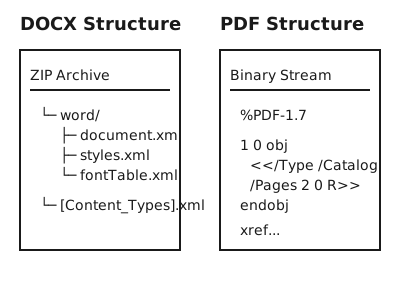
Why ZIP defines modern documents
If you rename a `.docx`, `.xlsx`, or `.pptx` to `.zip`, your operating system will happily extract it. This is because the Office Open XML (OOXML) standard leverages standard ZIP compression to bundle XML trees, images, and font files into a single artifact.
This allows you to programmatically modify a DOCX file without Microsoft Word installed, simply by unzipping the archive, executing a regex replace on `word/document.xml`, and re-zipping the directory. It is the definitive approach for server-side document generation.
The UTF-8 Mandate
Text encodings define how binary arrays translate into human-readable characters. For decades, Windows relied on code pages like Windows-1252, leading to catastrophic "mojibake" when files crossed language boundaries. The industry has converged on UTF-8, an ingenious variable-width encoding that uses 1 byte for ASCII characters and up to 4 bytes for obscure symbols or emojis.
If a text document looks like `é` instead of `é`, you are almost certainly experiencing an encoding mismatch—specifically, reading a UTF-8 file as if it were Windows-1252.
Typography and layout shifts
When you send a DOCX to a client and they complain the formatting is "messed up," 90% of the time, it's a typography failure. If they do not have the specific font installed (e.g., Helvetica), their Word application will silently substitute it with a fallback (e.g., Arial). Because Arial characters have slightly different widths than Helvetica, words will wrap at different points, pushing text down, creating orphaned lines, and shifting subsequent elements.
PDF avoids this via font subsetting. When you create a PDF, the engine embeds only the specific glyphs you used directly into the file's binary stream. The recipient's machine does not need the font installed; the PDF contains the mathematical curves required to draw it.
Can documents contain malware?
Yes. The assumption that documents are merely "data" is false. PDFs support embedded JavaScript and historically supported Flash (until it was ripped out of the standard). DOCX files support VBA Macros. If you download a file from an untrusted source, the safest way to view its contents without triggering execution is to parse it purely as text or via an isolated sandbox—which is exactly what our browser-based approach provides.
Inspect without executingFile extensions are an illusion
A file extension is a hint, not a physical law. An operating system uses it to know which application to launch, but the application uses "Magic Numbers" (File Signatures) to verify the file. A valid PDF always starts with `25 50 44 46` in hex (`%PDF`). If you rename an `.exe` to `.pdf`, the hex header remains `4D 5A` (`MZ`), and any competent PDF reader will instantly reject it.
You can use our Hex Viewer tool to verify the true identity of any file before you attempt to execute or open it.
Data compression in documents
PDFs utilize internal streams compressed via `FlateDecode` (essentially zlib/DEFLATE). This means zipping a PDF rarely reduces its size significantly, as the internal data is already compressed. If a PDF is massive, it is almost entirely due to uncompressed, high-resolution imagery stored within the document payload.
DOCX files, being ZIP archives, are natively compressed. If you need to shrink a DOCX, you can rename it to `.zip`, open `word/media/`, and manually compress the source JPEGs before rezipping.
The PDF/A standard for preservation
If you are archiving legal or government documents, standard PDF is insufficient. The ISO 19005 (PDF/A) standard requires that everything necessary to render the document—fonts, color profiles, images—is fully embedded. It strictly forbids external references, encryption, and JavaScript. A valid PDF/A created today is mathematically guaranteed to render identically in 100 years.
Read the PDF/A Guide →The Web APIs powering local viewing
We rely on two core HTML5 features: the `FileReader` API and `ArrayBuffer`. When you select a file, the `FileReader` reads the file natively off your disk into memory. It is exposed to JavaScript as an `ArrayBuffer`—a raw byte stream. From there, WebAssembly modules or pure JS engines (like PDF.js) can interpret the bytes and paint them to a `<canvas>` element without ever constructing an HTTP POST request.
Common Use Cases for Local Viewing
- Medical Records: Viewing lab results or clinical data without violating HIPAA or GDPR by sending them to a third-party server.
- Legal Contracts: Reviewing NDAs, M&A drafts, and employment contracts on an isolated machine.
- Development & Debugging: Ripping apart corrupted `.docx` files generated by a faulty backend system to inspect the broken XML manually.
Frequently Asked Questions
Is this really secure?
Yes. The parsing logic is written in JavaScript and executes entirely within your browser's sandbox. If you disconnect from the internet after loading this page, the viewer will still work.
Why do some PDFs look slightly different?
Browsers use different font rendering engines than native applications like Adobe Acrobat. If a PDF relies on system fonts that aren't available, or uses highly complex blending modes, the HTML5 Canvas interpretation may have slight discrepancies.
What is the file size limit?
The limit is dictated by your device's available RAM, not our servers. Modern browsers can comfortably parse 50MB+ PDFs in memory, though older mobile devices may struggle.
Ready to inspect?
Stop uploading your private files to arbitrary servers. Use the power of your browser.